
Meet the
BeCozU App
Complete session control, live biometric feedback, and daily sleep history in one clean interface.
Pair your earbuds, adjust taVNS intensity across 10 levels, and track your nightly heart rate trends. Scan the code or tap below to install.
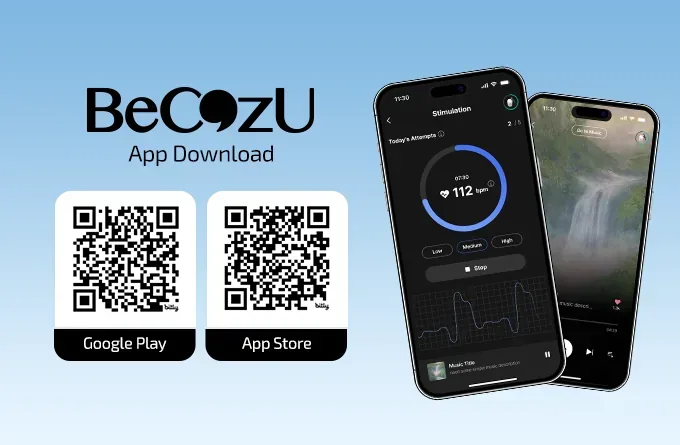
Live Stimulation Control.
Start a session from here and the same circle tracks the countdown and your live heart rate for as long as it runs.
Raise or lower intensity one step at a time, each change confirmed before it takes hold.
The 30-minute timer counts down while a live heart-rate graph runs beneath it.
Stop ends the session outright, and up to 10 attempts are tracked here each day.
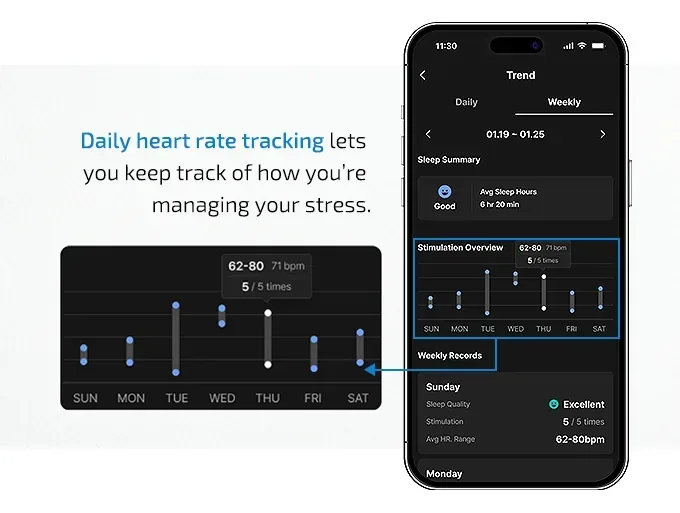
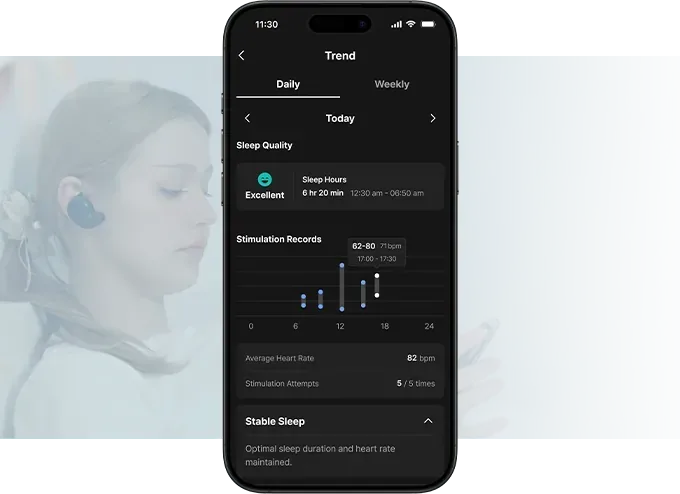
Daily heart rate & sleep tracking.
The main screen keeps a live PPG reading, today's stimulation count, connection status, and battery in one place.
See your heart rate and stimulation history on a daily and weekly basis.
Daily view shows the sleep score you gave the night yourself, today's stimulation count, and average heart rate.
Weekly view gathers the daily data into a longer trend in sleep efficiency.
5 Steps from Unboxing to Sleep.
Insert, pair, choose your level, and let the timer finish it.
Insert
Insert BeCozU into your ear, so the electrode contacts rest comfortably against the outer ear.
Pairing
Pair the earbuds in your phone's Bluetooth settings first, then connect inside the app.
Configure Your Session
Set the intensity in the app: 10 levels, one step at a time. Start low, and raise it only if you want to.
Start Session
Use for 15 to 30 minutes, before bed or during a midday break. Elapsed and remaining time stay on screen.
Monitor Progress
Track your daily and weekly trends in the app dashboard.
Whenever you
need it.
Before bed or for a midday reset, BeCozU walks through the same quiet half hour every time.